10 changed files
README.md
Jacob Kobrick
I study computer science at Arizona State University and work as a software engineering intern at FOX Technology.
Education
Arizona State University
B.S. in Computer Science - December 2027
Experience
Projects
- Prediction Market Inefficiency Research: testing whether mispriced Bitcoin contracts could be traded profitably after spread and fees.
- Mata: a desktop chat app for local Ollama models and cloud models, with subscription-based usage.
- ChatMap: a Chrome extension for finding messages in long ChatGPT conversations.
- Keepsmile BLE research: figuring out how to control my LED lights directly over Bluetooth.
- Open MC Host: a self-hosted dashboard for running Minecraft servers and giving friends access.
- KVM Switch: working toward one shortcut to switch a monitor, keyboard, and mouse between a PC and a Mac.
- ArcRaidersUtil: reading inventory screenshots to identify items, stack counts, and their positions.
- Toggle Reddit Sidebar: an older Chrome extension that hides the Reddit sidebar and remembers the setting.
Documentation
Building an Automated Prediction Market Trading System
Links
experience/fox.md
FOX Technology
Software Engineering Intern
June 2025 – Present · Tempe, AZ
I work on software projects supporting FOX's broadcast and streaming infrastructure, including real-time video systems, machine learning, backend development, and automation. I've been fortunate to work with a great team of engineers and operators who share their experience and help me understand how these systems are used day to day. Together, we work through operational problems, develop new tools, and improve existing production systems.
Areas of Work
Video & Machine Learning
I contribute to software for real-time video processing, monitoring, and analysis, including GPU-accelerated machine learning applications. This involves working with video streaming protocols, media pipelines, and performance issues in systems handling live content.
Backend & Platform Engineering
I help build internal tools, APIs, and web applications that integrate with broadcast infrastructure and operational systems. This includes backend services, connections to existing platforms, and updates that make legacy software easier to use and maintain.
Some of this work involves Skyline's DataMiner, including applications that use its APIs and moving existing tools into standalone web apps. I also help improve resource management to reduce licensing costs.
Automation & Systems Integration
I work on automation and control software for broadcast equipment and media delivery workflows. These projects connect software and hardware to reduce manual steps and support reliable delivery of live and on-demand content.
In DataMiner, I develop C# scripts and XML-based protocols for stream provisioning, routing, and failover. I've also built tools for auditing automation scripts and keeping them in sync with GitHub.
Infrastructure & Reliability
I help develop tools for monitoring and troubleshooting distributed systems. I work with cloud infrastructure, logs, and performance data to understand problems and help the team improve how production systems run.
Technologies
Python - C# - C/C++ - CUDA - DataMiner - XML - Docker - AWS - GStreamer - WebRTC - REST APIs - Linux - Git
projects/prediction-market.md
Prediction Market Inefficiency Research
I wanted to find out whether Kalshi's 15-minute Bitcoin contracts were being mispriced in a way I could actually measure. I didn't have a strategy when I started, so the first thing I built was a recorder. The backtester, paper-trading engine, and live executor came later.
How it works
Two recorders save the market data and the CF Benchmarks Bitcoin index into SQLite. A Python asyncio service keeps the order book in memory, runs the strategy, and sends orders. FastAPI serves the dashboard.
Every signal goes into a paper ledger, even if no live order gets sent. That lets me compare what the strategy wanted to do with what actually happened. Before sending an order, the executor checks the exchange status, available funds, and order and session limits.
The backtester replays the recorded markets with spread and fees included. I wanted to test prices I could realistically have gotten.
What I learned
The XGBoost models looked promising until I compared them with the market price. The price alone did slightly better on the held-out data. The models weren't finding anything the market didn't already know, so I stopped using them and moved to a simpler rule based on how the contracts settle.
The full write-up covers those experiments and what happened in live trading, including a recorder that stopped receiving data even though its connection still looked healthy.
Research report
projects/mata.md
Mata
I built Mata because I wanted a desktop UI for the Ollama models I run at home. It also supports signing in with ChatGPT. The app uses Electron, Next.js, and Zustand, and saves chat history as JSON files on disk.
Choosing a model
You can choose Ollama, ChatGPT, or auto mode for each message. Auto checks whether Ollama is running and the selected model is installed before falling back to ChatGPT. Image attachments stay local because the ChatGPT route used by the app doesn't accept them.
The app includes model downloads, chat search, bookmarks, and a minimap for navigating long conversations. A global shortcut opens a small always-on-top window for quick questions.
Shared provider core
I moved the backend integrations into mata-provider-core so they wouldn't be tied to React state. Both providers implement the same methods for checking availability, listing models, and streaming responses.
The package has no React or Electron dependency. Ollama uses fetch directly, while ChatGPT goes through a bridge supplied by the host app. That keeps the desktop session handling outside the shared code.
Links
projects/chatmap.md
ChatMap
ChatMap is a Chrome extension for finding things in long ChatGPT conversations. It adds a minimap beside the chat so you can jump back to a message without scrolling through everything in between.
Implementation
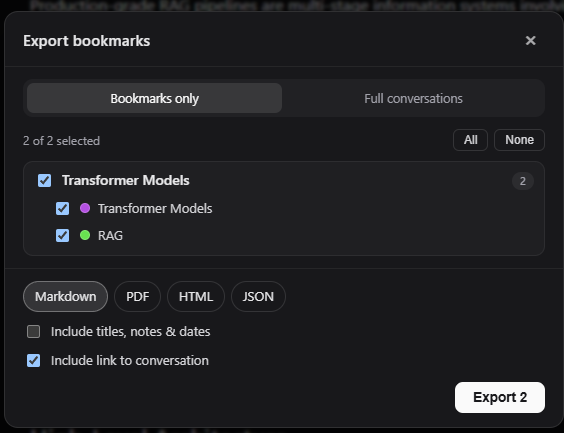
I built it with TypeScript and React, using Vite to bundle the extension. Hovering over a marker shows a preview of the message. Clicking it takes you there. You can also bookmark messages and move between them with keyboard shortcuts.
You can export the whole conversation or just your bookmarks. The extension popup is where you change the keyboard shortcuts.
Links
projects/keepsmile.md
Keepsmile BLE research
The official app for my LED lights was slow, full of ads, and limited to a short list of effects. I wanted to control the lights directly, but their Bluetooth protocol wasn’t documented.
Finding the protocol
I used PacketLogger to capture the Bluetooth traffic while changing colors, brightness, and effects in the app. Then I compared the ATT writes to work out which bytes changed with each setting. All the commands go through one GATT characteristic.
Implementation
Once I had the commands figured out, I built a Python CLI and desktop app with Bleak. I also built a Mac menu bar app in Swift with CoreBluetooth. It supports custom color cycles, voice commands, and light effects.
I’ve tested this on KS03 lights. Other models may use a different protocol.
Links
projects/open-mc-host.md
Open MC Host
Open MC Host is a web dashboard for running Minecraft Java servers on your own Linux machine or cloud VM. I built it with Node.js and the Docker CLI. Game processes run in containers, while worlds and configuration stay on disk.
Managing servers
It supports Vanilla, Paper, Purpur, Fabric, Forge, and NeoForge, with exact version selection. The dashboard handles server controls, logs, console commands, files, backups, and resource monitoring.
Modrinth and Hangar searches filter content by compatibility. Before installing a mod or plugin, you can inspect its version and dependencies. Downloads are checked against provider checksums before installation.
Sharing access
Friends get separate accounts through invitations, with roles, server ownership, quotas, and an audit history. File operations stay within each server's data directory. An optional SSH menu exposes specific actions without giving users a Linux shell.
The dashboard also separates container health from public reachability. A running server doesn't necessarily mean a friend can connect through the firewall or router.
Links
projects/kvm-switch.md
KVM Switch
I'm working on a project called Handoff. The goal is to use one shortcut to switch a monitor's input and send keyboard and mouse input to another computer over the local network.
What works so far
I wrote a Rust command-line tool that finds connected monitors through the Windows display APIs, reads their identity, and queries DDC/CI controls.
So far, I've used it to change a monitor's brightness, read the value back, and restore the original setting. I also ran monitor discovery 50 times to check for leaked handles. The handle count stayed stable.
What’s next
I still need to verify that switching inputs and restoring the original input work reliably on the hardware. After that comes secure communication between the computers and forwarding the keyboard and mouse input.
It's still early. I'm checking what the monitor controls can do before building the rest of the app.
Links
projects/arc-raiders-util.md
ArcRaidersUtil
I built a Python pipeline to turn Arc Raiders inventory screenshots into structured data. The idea was to get item names, quantities, and positions out of an image so they could be used to decide what to keep or sell.
How it works
I scraped item icons from the wiki and built a reference dataset with Pillow and ImageHash. Each icon gets three perceptual hashes, pHash, dHash, and wHash, so matching doesn't depend on the screenshot having identical pixels to the original icon.
The parser splits a cropped inventory screenshot into a 6-by-4 grid, skips empty slots, and compares the center of each tile with the reference icons. It only accepts a match when all three hash distances fall within their thresholds.
Tesseract reads the stack count from the corner of each tile. The output is JSON grouped by item, with a quantity and grid position for each stack. That gives the cleanup logic something to work with without having to read the screenshot again.
Links
projects/toggle-reddit-sidebar.md
Toggle Reddit Sidebar
An older Chrome extension I built to hide Reddit's left sidebar. It does one small thing and remembers the setting between page loads.
How it works
The popup sends a message to a content script, which toggles the sidebar's visibility. The preference is saved with chrome.storage.local and applied when the script loads again.
It's plain JavaScript, HTML, and CSS using Manifest V3. The content script targets Reddit's sidebar element directly, so it depends on that page structure staying the same.